
reHDDPrinter
- Generate label and print them via brother QL-570.
- Receive data from reHDD via IPC message queue.
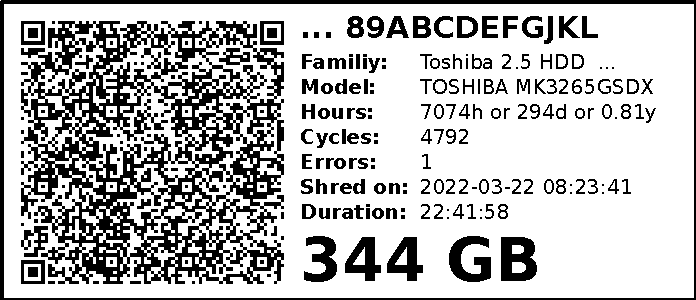
Example Label
Install
pip install qrcode brother-ql
cd /root/
git clone https://git.mosad.xyz/localhorst/reHDDPrinter.git
cd reHDDPrinter
chmod +x reHDDPrinter.py
cp reHDDPrinter.service /lib/systemd/system/reHDDPrinter.service
systemctl daemon-reload
systemctl enable --now /lib/systemd/system/reHDDPrinter.service
Test printer manually
  export BROTHER_QL_PRINTER=file:///dev/usb/lp0
  export BROTHER_QL_MODEL=QL-570
brother_ql print -l 62 Untitled.png
Printer/Paper Info
- Brother QL-570
- Paper With: 62mm or 696px
Hint: Some Brother printers have enabled standby mode. This will disconnect the printer. See Issue #12 to disable standby.
see https://github.com/pklaus/brother_ql for details for printer access
Test IPC msg queue
Dummy Sender
cd dummy_sender
clear && g++ -Wall main.cpp -o dummy_sender
clear && ./dummy_sender
Dummy Receiver
clear && python ./dummy_receiver.py
Clear IPC mgs queue
clear && bash ./cleanup_queues.py